Etisalat has rebranded as e& UAE, but it’s the same network, the same account, and the same balance you’ve always had — just under a new name. Whether your SIM is Wasel prepaid or postpaid, checking your balance takes seconds and doesn’t cost anything.
Quick Answer: Dial *121# to check your Wasel prepaid balance instantly, free of charge. Postpaid customers should dial *140# instead — it checks your plan allowances, not core credit.
Method 1: Check Etisalat Balance via USSD Codes (No Internet Required)
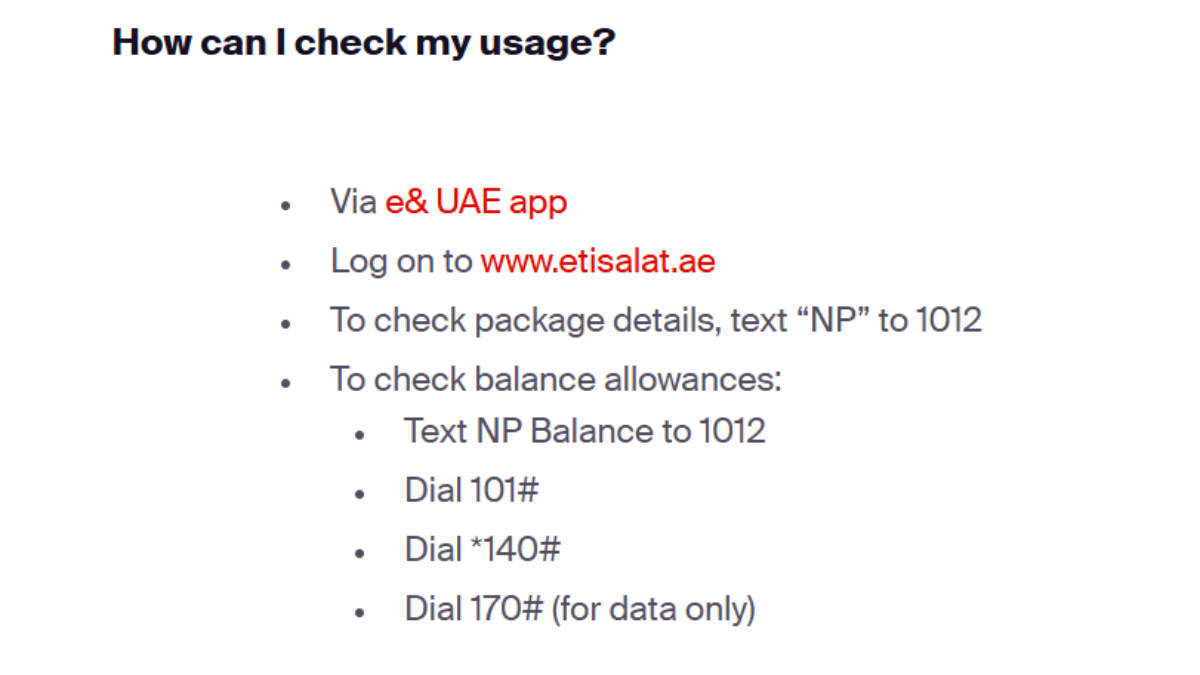
USSD codes are the fastest way to check your balance because the network responds directly to your dialer — no app, login, or data connection needed. e& UAE actually runs four separate codes depending on what you want to check, and mixing them up is the single most common mistake:
For Wasel Prepaid: Dial *121#
- Open your phone’s dialer app.
- Enter *121# and press the call button.
- Your available AED balance and its expiry date appear on screen within seconds.
This is the correct code for Wasel prepaid core credit — it’s free and works even with zero balance.
For Postpaid Plans: Dial *140#
- Dial *140# and press call.
- The menu returns your postpaid allowances — remaining local/flexi minutes, SMS, and any data add-ons.
*140# is not a credit balance check — it’s for postpaid plan usage. If you’re on Wasel prepaid, use *121# instead.
For Data Allowance Only: Dial *170#
Dial *170# to instantly see your remaining data (MB/GB) and how long your active data pack stays valid.
For Full Service Menu: Dial *101#
Dial *101# for an interactive menu covering balance checks, recharge, current offers, and package purchases in one place — useful if you’d rather navigate a menu than memorize separate codes.
Method 2: Check Balance via the e& UAE Mobile App
The app (formerly “My Etisalat UAE”) suits anyone who wants balance, usage, and billing in one dashboard rather than a one-off code.
- Download the e& UAE app from the Apple App Store or Google Play.
- Sign in with your registered mobile number or UAE PASS.
- Your current balance appears on the app’s home dashboard, alongside usage and top-up options.
Method 3: Check Balance via the e& Online Self-Care Portal
Both official web portals are still active — etisalat.ae and eand.ae — so either one works for self-care login.
- Go to etisalat.ae or eand.ae and select “My Account.”
- Log in using your mobile number or UAE PASS, then verify the OTP.
- Your balance, transaction history, and recharge options appear directly on the account dashboard.
Alternative Balance Check Methods (SMS & IVR)
| Method | How | Notes |
|---|---|---|
| SMS — Postpaid allowances | Text “NP Balance” to 1012 | Returns a detailed postpaid bill/benefit summary |
| SMS — Data balance | Text “DATA” to 1010 | Returns remaining data volume |
| IVR — Wasel prepaid | Dial 121 (voice call) | Automated voice balance inquiry |
| Roaming balance check | Call +971 4004121 | For Wasel prepaid balance while abroad; standard international rates apply |
Next Steps: Topping Up & Paying Your Bill
If your balance check shows an outstanding amount or zero credit, you can recharge or settle your bill directly through the official Quick Pay portal on etisalat.ae or eand.ae without logging in — useful if you just need to top up fast and sort the account details later.
Frequently Asked Questions (FAQs)
What is the USSD code to check Etisalat balance?
*121# for Wasel prepaid core balance, and *140# for postpaid plan allowances. They check different things, so using the wrong one is the most common source of confusion.
What’s the difference between *121# and *140#?
*121# shows your actual Wasel prepaid AED credit and its expiry. *140# shows postpaid usage — remaining minutes, SMS, and data add-ons — not a cash balance.
How do I check my Etisalat data balance?
Dial *170#, or text “DATA” to 1010 for an SMS reply with your remaining data.
Can I check my Etisalat balance without internet?
Yes — every USSD code and SMS method above works without a data connection, since they run over the mobile network itself.
How do I check my balance while roaming abroad?
Call +971 4004121 for a Wasel prepaid voice balance check, or open the e& UAE app over Wi-Fi to avoid roaming data charges.
Are balance inquiries free?
Yes. All domestic USSD codes, SMS checks, and app/portal logins are free of charge.
Why does the app store listing say “e& UAE” instead of “Etisalat”?
Etisalat UAE rebranded to e& UAE, but it’s the exact same provider and account — not a separate app or company. Both etisalat.ae and eand.ae remain live, official portals for the same service.
I just topped up online but my balance hasn’t updated — what should I do?
Wait 5–10 minutes and re-check via *121#. Online top-ups occasionally take a few minutes to reflect even though the payment itself goes through immediately.
Need More Help? e& UAE Customer Support
| Domestic Customer Care (UAE) | 101 |
| International Customer Support | +971 800 101 |
| Roaming Wasel Balance Line | +971 4004121 |
| Official Portals | eand.ae / etisalat.ae |